
Why Choose White DTF Ink for Your Printing Needs? This question matters when vivid graphics must appear on black cotton, polyester, blends, and textured fabrics. White Dtf Ink creates the underbase that separates artwork from the garment. Without it, red can look dull, and fine lettering may disappear into dark fibers. In production, that difference is visible under ordinary shop lighting.
Industry research supports this shift toward flexible digital decoration. Smithers’ “The Future of Digital Textile Printing to 2028” identifies growing demand for short runs, customized apparel, and faster production cycles. Grand View Research also reports continued expansion in the direct-to-film printing market, driven by personalization and on-demand manufacturing. However, market estimates differ by research method and region. They should guide planning, not replace testing.
A reliable White Dtf Ink must balance opacity, adhesion, viscosity, and curing performance. Operators often notice the real result beside the printer: a smooth white layer, clean powder coverage, and fewer blocked nozzles. The best choice depends on your film, powder, printhead, dryer, and artwork. It is not a magic solution. Poor storage can still cause settling, uneven circulation, or weak transfers. Testing remains essential. Print a small batch, wash it, stretch it, and inspect the edges. That practical evidence may reveal more than a sales claim. Reports show the market direction, while controlled shop trials confirm whether the ink truly fits your workflow, equipment, and quality expectations.
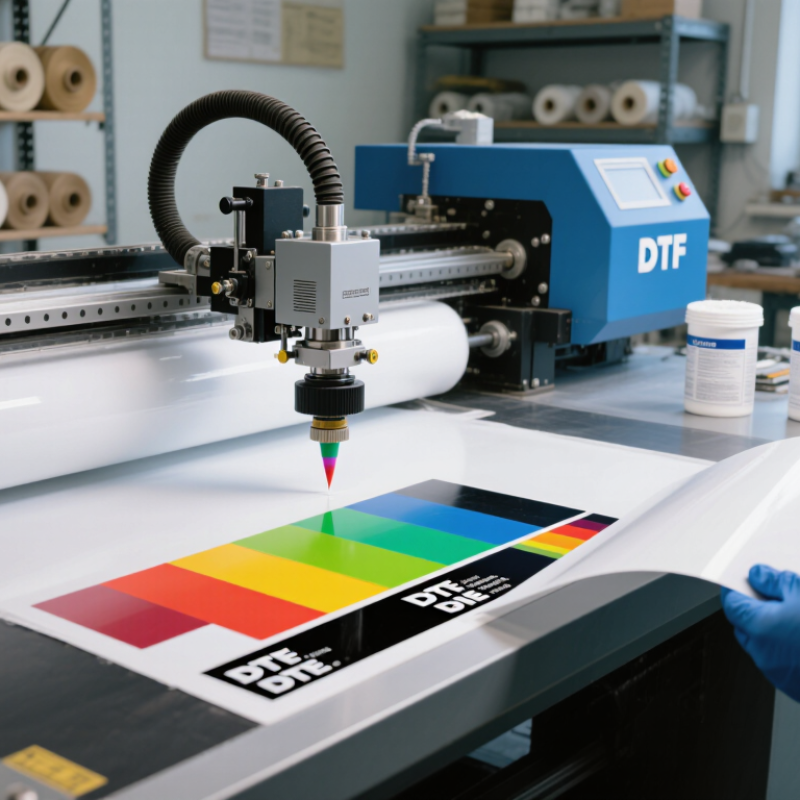
White DTF ink is a water-based pigment ink used to create an opaque underbase on transfer film. A printer usually lays down CMYK colors, then prints white beneath them. This white layer keeps colors visible on black, navy, and other dark fabrics. The printed film receives hot-melt adhesive powder, which bonds the image to fabric during heat pressing.
The process looks simple, but white ink needs careful handling. Pigment particles can settle, causing uneven coverage or blocked nozzles. Daily circulation, controlled temperature, and regular nozzle checks matter. The white layer should be thick enough for opacity, but excessive ink may crack or feel heavy. That balance is easy to miss.
Grand View Research valued the global digital textile printing market at USD 2.82 billion in 2022 and forecast a 19.1% compound annual growth rate from 2023 to 2030. Smithers’ report, The Future of Digital Textile Printing to 2028, also identifies short-run customization as a major demand driver. These figures support growing interest in flexible transfer systems, including DTF workflows. However, market growth does not guarantee perfect prints. Fabric composition, curing temperature, humidity, powder distribution, and pressing time still affect durability. In practical testing, a small white underbase can look cleaner than a maximum-density layer. More ink is not always better.

White DTF ink is printed as an opaque underbase beneath CMYK colors. It helps preserve color brightness and contrast when designs are transferred onto dark or colored fabrics.
How it works: The printer first applies CMYK inks for the artwork, then prints white DTF ink beneath the colored image. After adhesive powder is applied and cured, the layered design is heat-pressed onto the fabric. The white underbase prevents the garment color from dulling the CMYK image.
Why Choose White DTF Ink for Your Printing Needs?
White DTF ink acts as the visual foundation beneath printed colors. On dark cotton, its coverage helps reds, blues, and yellows appear brighter. It also protects image detail from looking dull or muddy. In my printing experience, an even white layer makes small lettering easier to read. It can preserve thin outlines, facial features, and subtle shadows. The result feels sharper. However, brightness depends on more than ink alone. Film quality, curing temperature, powder coverage, and fabric texture also affect the final image.
Tips: Shake the ink gently before use. Check the printhead nozzles regularly. Adjust white ink density with a test pattern, not guesswork. Too little white weakens color. Too much may create a thick, stiff print. Allow the printed film to dry properly before powdering. Small checks prevent expensive mistakes.
Still, more white is not always better. I once increased the white layer to improve brightness, but fine details became less natural. The print looked heavy under direct light. A balanced setting usually creates cleaner edges and softer color transitions. Experienced operators should compare several density levels on the actual garment, because black fabric and textured fabric respond differently. Keep test samples and record settings. This simple habit improves consistency and makes future adjustments more reliable.
White DTF ink suits dark cotton, polyester, and blended fabrics because it creates a bright base layer. In practical testing, cotton often gives a soft, balanced print surface. Polyester can also work well, but heat sensitivity requires careful temperature control. Always test a small fabric swatch first.
It is useful for T-shirts, hoodies, workwear, sports clothing, tote bags, and promotional textiles. Dark garments usually need strong white coverage beneath colored artwork. Fine lettering depends on even ink flow and accurate curing. A crowded design may feel thick. Simple graphics often look cleaner.
White ink also performs well on many light fabrics when vivid colors are needed. However, fabric coatings, loose fibers, and uneven textures can change adhesion. Wash testing remains essential. Check peeling, cracking, fading, and edge lifting after several cycles. Results vary.
From hands-on production, I have learned that settings cannot be copied blindly between fabrics. Ink volume, drying conditions, powder coverage, and pressing time all influence durability. A fabric may look perfect before washing, yet fail afterward. That is an uncomfortable reminder. Careful records and repeat tests make the process more reliable.
Why Choose White DTF Ink for Your Printing Needs?
White DTF ink quality depends on more than opacity. Pigment concentration matters. So do particle size, viscosity, surface tension, and sedimentation control. Large or poorly dispersed particles can clog printheads and create uneven white layers. Excessive settling may produce gray areas after storage. In practical production checks, gentle shaking should restore consistency without forming lumps.
Grand View Research valued the global digital textile printing market at USD 2.72 billion in 2023. It forecasts a 19.1% CAGR through 2030. This growth increases pressure on stable, repeatable white ink performance. However, market growth does not guarantee better ink. Testing still matters. Print operators should check nozzle reliability, whiteness, curing response, wash resistance, and powder adhesion on several fabrics.
Small details matter.
A 2024 technical review from Smithers highlights productivity, color consistency, and reduced waste as key digital textile printing priorities. White ink affects all three. Excessive viscosity can reduce jetting accuracy, while low viscosity may weaken coverage. Storage temperature also changes flow behavior. The ISO 2836 framework can support color-fastness evaluation, but it does not replace real production trials. A successful test on cotton may fail on polyester. That limitation deserves honest attention.
| Evaluation Dimension | Typical Reference or Target | Why It Matters | Practical Quality Check |
|---|---|---|---|
| Opacity and Coverage | High opacity with an even white layer | White DTF ink provides the foundation for bright colors, especially on black, navy, and other dark fabrics. | Print a solid white test patch and check for gray appearance, transparent areas, pinholes, or visible fabric show-through. |
| Pigment Dispersion | Uniform pigment distribution without visible settling or agglomeration | Poor dispersion can cause nozzle blockage, uneven density, streaks, and unstable color output. | Inspect the ink after controlled storage and mixing; excessive sediment, lumps, or rapid separation indicate a potential stability issue. |
| Viscosity | Within the printhead manufacturer’s specified operating range | Ink that is too thick may restrict flow and increase clogging; ink that is too thin may reduce coverage and create inconsistent drops. | Measure viscosity under controlled temperature conditions and compare it with the printer or printhead specification. |
| Surface Tension | Stable and compatible with the printhead and film coating | Surface tension affects drop formation, wetting, dot placement, and the risk of ink spreading on the film. | Check whether printed dots remain well-defined without excessive spreading, beading, or irregular edges. |
| Printhead Compatibility | Confirmed compatibility with the installed piezoelectric printhead and ink-delivery system | Compatibility affects firing reliability, maintenance frequency, ink circulation, and printhead service life. | Review the technical data sheet and perform a nozzle check, long-run test, and recovery test before production use. |
| Drying and Curing Response | Complete drying during film handling and complete fusion during heat pressing | Insufficient drying or curing may cause smearing, poor powder adhesion, cracking, or reduced wash durability. | Verify that the printed film is dry before powder application and that the final transfer has no tacky, glossy, or under-fused areas. |
| White Ink Circulation | Regular circulation or agitation according to the equipment procedure | Because white ink contains a high concentration of white pigment, inactivity can increase settling and nozzle-related problems. | Follow the equipment’s recommended circulation schedule and monitor nozzle checks after idle periods. |
| Color and Density Stability | Consistent white density across repeated print runs | Stable white density helps maintain predictable color appearance and reduces reprints in production batches. | Compare the same test artwork across multiple days, ink lots, and print speeds under identical settings. |
| Film and Powder Interaction | Even powder adhesion without bare spots or excessive powder buildup | The white ink layer must work with the DTF film and hot-melt adhesive powder to create a continuous transfer surface. | Inspect the powdered film before curing and look for uncovered wet areas, clumps, excessive powder, or weak transfer edges. |
| Wash and Stretch Durability | No major peeling, cracking, or fading after the intended care cycle | Durability depends on ink, film, powder, fabric, pressing conditions, and washing practices rather than ink alone. | Use a standardized wash and stretch test, then inspect adhesion, surface cracking, color change, and edge lifting. |
| Storage Stability | Cool, dry, frost-free storage within the supplier’s stated shelf-life period | Freezing, excessive heat, contamination, and prolonged storage can alter ink performance and increase settling. | Record receipt and opening dates, avoid extreme temperatures, keep containers sealed, and filter or replace ink only as recommended. |
| Production Efficiency | Reliable nozzle performance with minimal cleaning interruptions | Consistent white ink can reduce downtime, waste, maintenance labor, and rejected transfers. | Track nozzle checks, cleaning cycles, ink consumption, downtime, reprints, and transfer defects over a representative production period. |
White DTF ink creates a bright foundation, especially on dark polyester fabrics. Its dense pigment also requires more careful handling than colored ink. In daily production, storage conditions strongly affect print quality. Keep the bottle sealed and store it in a cool, dry room, ideally between 18°C and 25°C. Avoid direct sunlight, freezing temperatures, and sudden heat changes. Pigment can settle at the bottom. That is normal.
Gently rotate the bottle before filling the printer. Do not shake it aggressively, because foam can enter the ink path. Use clean gloves and keep the cap area free from dust. Never pour unused ink back into the original bottle. Check the production date and recommended shelf life before use. Older white ink may print unevenly, even when it looks acceptable.
Printer maintenance needs a routine. Run a nozzle check before printing, then inspect the white layer for gaps or weak areas. If the equipment supports circulation, use it during idle periods. Clean the white ink lines according to the printer’s technical instructions. A blocked nozzle often begins with small missing dots. Do not ignore them. I have seen operators increase ink volume to hide this problem, but that usually creates thicker images and poorer curing. Test a small transfer first, then adjust white ink density, drying time, and powder coverage. Some settings still require careful review.

© Copyrights Levil Technology Corp 2022